

Black and white photography is the most timeless edit in the medium. The Visual Flow B&W Mixer is not a standard preset pack — it is a complete black and white processing system with one-click Final Mixes, a proprietary intensity profile, and a Mixology workflow that gives you near-infinite creative control inside Lightroom.



When To Use It
The Lighting Conditions That Define This Style
Wedding ceremony moments, first looks, emotional candids, dramatic backlit portraits, editorial and fine art portrait sessions, landscape photography, architectural detail shots, and any situation where stripping color amplifies the emotional impact of the image.


What Are Black and White Lightroom Presets?

Black and white photography is the original art form of the medium — and converting color images to monochrome in Lightroom is far more nuanced than simply desaturating. A great black and white edit controls luminosity, tonal contrast, grain structure, color channel mixing, and shadow detail independently to create images that feel deliberate and timeless rather than simply colorless.
Black and white presets for Lightroom automate these decisions with a single click, giving you a professional, consistent monochrome look without manually adjusting every channel. The style works across virtually every genre of wedding and portrait photography — ceremony moments, intimate portraits, reception candids, dramatic landscapes, and editorial work all benefit from a well-crafted black and white conversion.
Why Most Black and White Presets Are Too Simple
Most black and white presets do one thing: desaturate the image and add contrast. The result is flat, uninspired monochrome that lacks the tonal depth and character of true black and white photography. There is no control over individual color channels, no way to separate skin tones from backgrounds, and no system for adjusting the look once it has been applied.
The other common problem is that black and white presets are typically static. Apply one preset to a bright outdoor portrait and a dark reception candid and you will get wildly different results because the same tonal adjustments cannot work across different lighting conditions. The preset that creates beautiful contrast outdoors flattens the shadows indoors.
Introducing the Visual Flow B&W Mixer
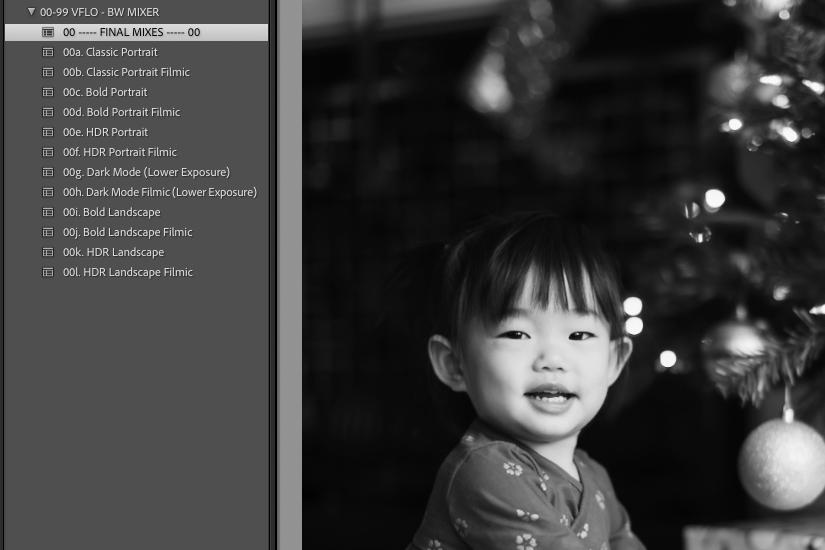
The B&W Mixer is unlike any black and white preset pack you have used before. Rather than offering a fixed set of one-click looks, it is a complete black and white processing toolkit built around three layers of creative control.
Set 1: Final Mixes. Ten one-click presets that deliver complete, professional black and white looks immediately. Each Final Mix has a descriptive name that tells you exactly what it does — from high contrast and gritty to soft and filmic. These are designed for photographers who want a fast, polished result without customization.
Set 2: The VF Mixer. A proprietary black and white profile that controls the overall intensity of each Final Mix. Apply a Final Mix, then use the VF Mixer to increase or decrease the strength of the conversion, giving you a level of creative control that is not possible with standard presets.
Set 3: Mixology. A step-by-step workflow system borrowed and refined from SLR Lounge, built specifically for black and white processing. The Mixology system breaks the black and white edit into four independent folders: BW Profile and Lighting Condition, Tone Curve, Stylization, and Color Grading. You can start with a Final Mix and adjust individual components, or build a look entirely from scratch using the Mixology workflow. Once you find a look you love, save it as a new Final Mix for future use.
The result is a system that offers near-infinite creative variety while remaining entirely non-destructive and integrated into your standard Lightroom workflow. Every adjustment is live and reversible.
What Makes the B&W Mixer Different from a Standard B&W Preset
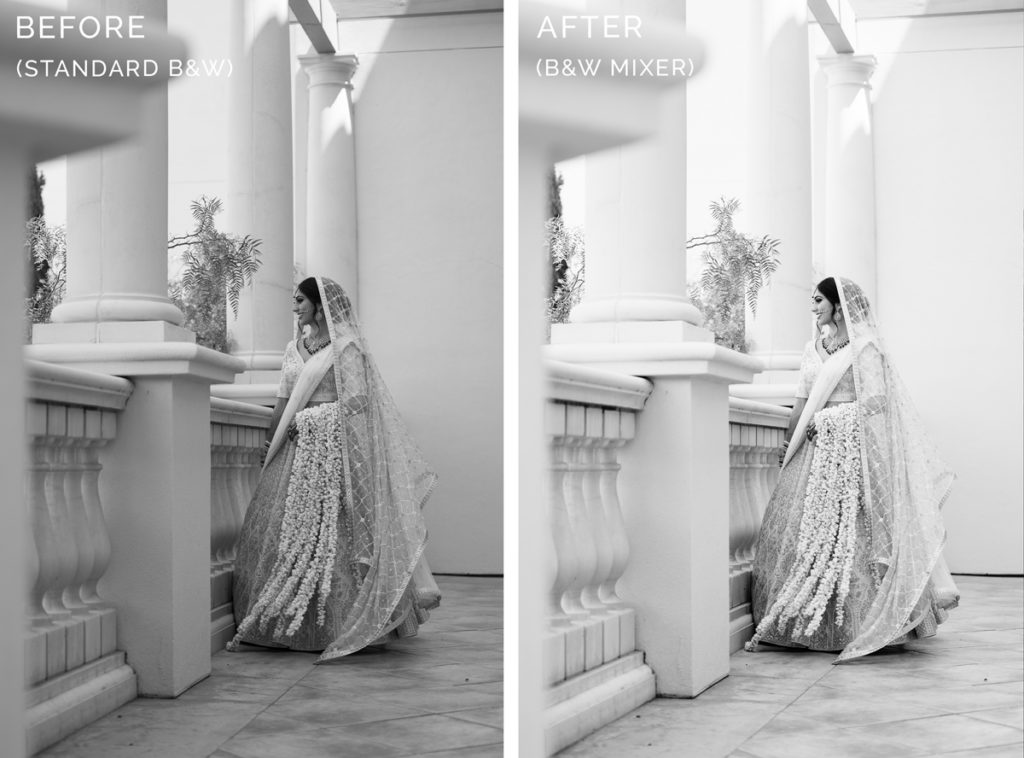
Every other pack in the Visual Flow lineup includes a single black and white preset alongside the color options. The B&W Mixer exists because that single preset was never enough creative control. Depending on the image and the desired result, you might want a high contrast gritty look, a soft matte film finish, a selenium-toned portrait, or a cool blue-tinted ceremony moment. A single preset cannot deliver all of these.
The Mixology system also gives you the ability to apply color toning — hints of blue, orange, yellow, sepia, and more — within the black and white processing workflow. This is the difference between a black and white image that feels like a snapshot and one that feels like a print from a darkroom.
What Photography Styles Work Best
Black and white processing works across every genre but is most powerful in situations where emotion, light quality, and composition are the primary subjects. Wedding ceremony moments, first looks, speeches, candid reception dancing, dramatic backlit portraits, and architectural detail shots all translate exceptionally well to monochrome. The B&W Mixer is equally strong for portrait sessions, editorial work, fine art photography, and landscape photography where color is a distraction rather than an asset.
Compatible Software and Formats
The B&W Mixer works with Lightroom Classic, Lightroom CC, Lightroom Mobile for iOS and Android, and Adobe Camera Raw. Presets and profiles are delivered in XMP format for Lightroom Classic and DNG format for Lightroom Mobile. One purchase covers all formats and all devices.
How to Use the B&W Mixer Effectively

Start with the Final Mixes to find the tonal direction that fits the image. Apply the VF Mixer profile to adjust intensity. If you want to customize further, open the Mixology folders and adjust the Tone Curve for contrast, Stylization for grain and vignette, and Color Grading for toning. Save any look you want to reuse as a new Final Mix in your User Presets folder.
For wedding galleries specifically, the B&W Mixer pairs naturally with any of the color packs. A common workflow is to edit the full gallery in a color pack like Modern or Mood, then selectively convert key emotional moments — the first look, the ceremony exchange, the speeches — to black and white using the B&W Mixer for maximum tonal impact.
Ready to Try It?
Get the B&W Mixer Preset Pack
One-click results tested across 10,000+ real images, built for every lighting condition.
View the B&W Mixer Pack