One of our frequently asked questions has to do with the core feature of our system. If you’ve ever scrolled through our home page and wondered why we chose to use 9 popular lighting conditions are the framework of our preset system, you aren’t alone. There definitely is a method to our madness.

Most presets don’t work for a simple reason, presets are created for an ideal type of image and lighting condition. When you capture images that aren’t intended for the ideal light + look, then the preset fails, and you’re left with manual adjustments to get to the image looking good.
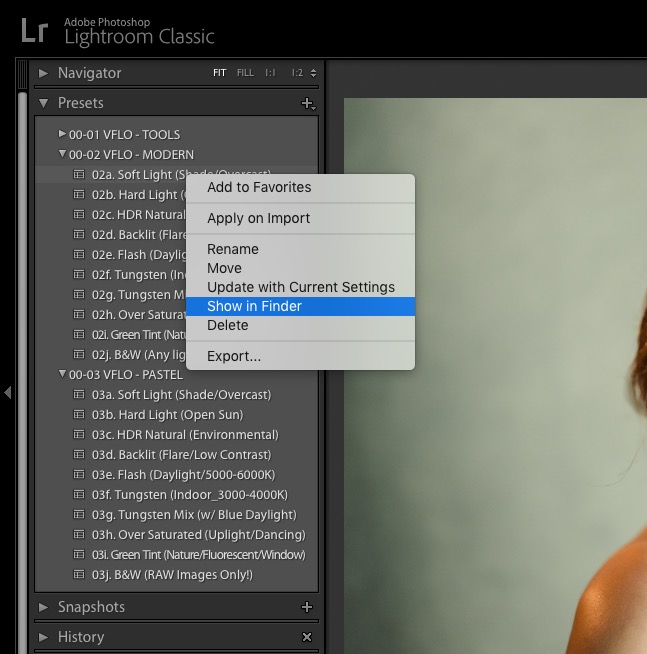
We recognized this years ago and began grouping images for development based on lighting conditions. Hundreds of thousands of images later, we ended up with was 100+ lighting conditions. What was unique though was that we could group those images into Lighting Conditions or LC’s that required different approaches to editing. After a year of additional testing, we ended up with the 9 lighting conditions you see in each Visual Flow Preset Pack.

What they represent is a singular look that’s been adapted to each of the LC’s that you’re most often shooting in. In fact, these 9 lighting conditions represent more than 99% of the typical portrait/wedding photographer’s imagery. It’s this process that was patentable, and why today you have Visual Flow Presets, presets designed for a simple visualized workflow.

To make the system even more powerful (and simple to use) we teamed up with DVLOP to utilize their profiles as our starting point. This helps us begin with closely unified colors between camera makes/models. For you, this means even more consistent results regardless of the camera you or your team are using. We’ve created 5 different packs that all follow this lighting condition-based system and each represents a different look:
To learn more about our Preset packs and our philosophy make sure you join our free Facebook group. We host monthly feature challenges for users to submit their images and get a chance to have their images posted on our Instagram and blog.